AI Flow
AI Flow is a visual builder for designing structured conversation flows without code. Unlike free-form AI that answers anything, AI Flow follows a path you define node by node — ideal for tasks that need definite steps like order tracking, lead qualification, or appointment booking.
Concept
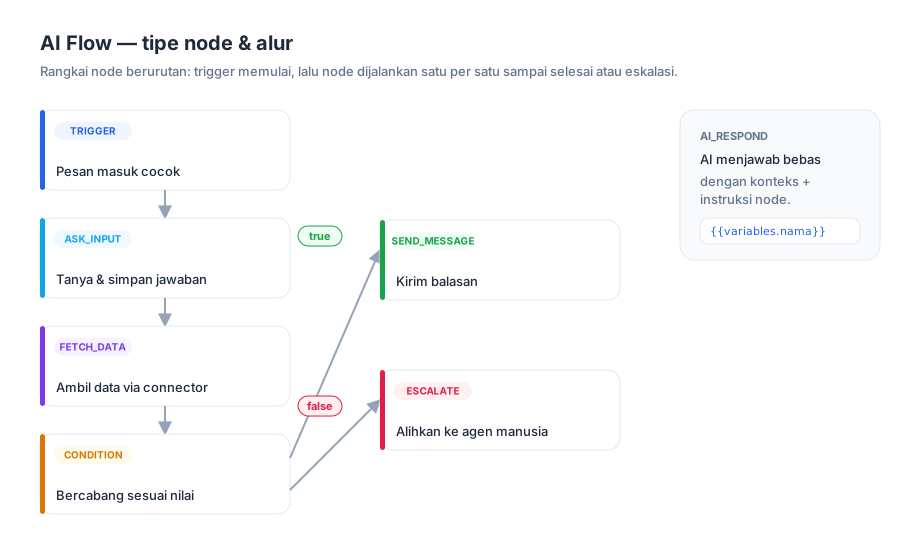
A flow consists of a chain of nodes executed in order. The flow starts when a customer message matches a trigger, then the engine walks the nodes one by one until it completes, stops, or escalates to an agent. Along the way, a flow can ask for input, fetch data from your systems, branch on conditions, and store answers into variables.
If several flows are active, the highest-priority flow whose trigger matches is used.
Trigger Types
A trigger decides when a flow starts running.
always
The flow is eligible for every incoming message. This is the default for a new flow. Use it when you want one flow to be the main entry point of the conversation.
keyword
The flow runs if the message contains any of the keywords you set. Matching is substring and case-insensitive — you can enter a single keyword or a list.
Note: because matching is substring-based, the keyword
orderalso matches "reorder" or "border". Pick distinctive keywords to avoid false triggers.
intent
Coming soon. Intent-detection triggers (powered by AI) are still in development and not active yet. For now use
keywordoralways.
Node Types
There are seven node types you can chain together. Most nodes have a next node setting that determines the following step.
send_message
Sends a text message to the customer. Fill the content field with text; it supports variables like {{variables.name}}. Then continues to the next node.
ai_respond
Lets AI answer using the conversation context. Fill instruction with guidance for AI at this step (e.g. "Answer questions about opening hours"). AI uses the conversation history plus that instruction to compose a reply. If AI fails, the flow stops safely.
ask_input
Asks something, then stores the customer's answer. Settings:
- prompt — the question sent (supports variables).
- store_as — the variable name where the answer is stored.
- validation (optional) — a regex pattern plus an error message shown if the answer is invalid.
- max_retries — the number of failed attempts before escalating to an agent (default 3).
After the question is sent, the flow waits for the customer's next message. If valid, the answer is stored to the variable and the flow continues; if it fails beyond the retry limit, the conversation escalates.
fetch_data
Fetches data from your systems via an AI Connector. Settings:
- connector_slug — the slug of the active connector to call.
- args — arguments sent to the connector (support variables).
- store_as — the variable where the result is stored (default
fetched_data).
The connector result (usually JSON) is stored to a variable and can be used by later nodes. Learn how to set up a connector in the AI Connector guide.
condition
Branches based on a variable's value. The condition setting has:
- variable — the variable path (supports dots, e.g.
order.status). - operator — one of:
==,!=,>,<,>=,<=,contains. - value — the value to compare against (supports variables).
Then true_node_id (if true) and false_node_id (if false). The >, <, >=, <= operators are for numbers only; contains is for text (substring, case-insensitive).
switch
Multi-way branch (1 → many) when one variable can take several values — use it instead of chaining many condition nodes for a "pick A / B / C / D" split. The switch setting has:
- variable — the variable path to test (same dot syntax as
condition). - cases — an ordered list of
{operator, value, target}. Each case is one output handle on the node.
Cases are evaluated top to bottom; the first match routes the flow to that case's target node. If no case matches, the default output is used. Operators behave exactly like in condition. Connect each case output (indigo dots) and the default output (gray dot) to a target node.
escalate
Ends the flow and hands the conversation to a human agent. Settings: reason (for tracking) and message (an optional farewell sent before handoff).
Variables
Variables hold data throughout a flow and are inserted into text with the {{variables.key}} syntax. Dotted paths are supported for nested data, e.g. {{variables.order.status}}.
Variables are filled from:
_trigger_message— automatically holds the customer message that triggered the flow.- ask_input — stores the answer under the name in
store_as. - fetch_data — stores the connector result under the name in
store_as.
How to Build
- Open the AI Flows menu in the business panel, click Create Flow.
- Name the flow and set the trigger (always or keyword).
- Add nodes onto the canvas, connect their order, and fill each node's settings.
- Set the entry node.
- Activate the flow so it starts handling conversations.
Ready-to-Use Flow Examples
The six examples below use the exact same node types and settings as in the builder.
Example 1: Order Tracking
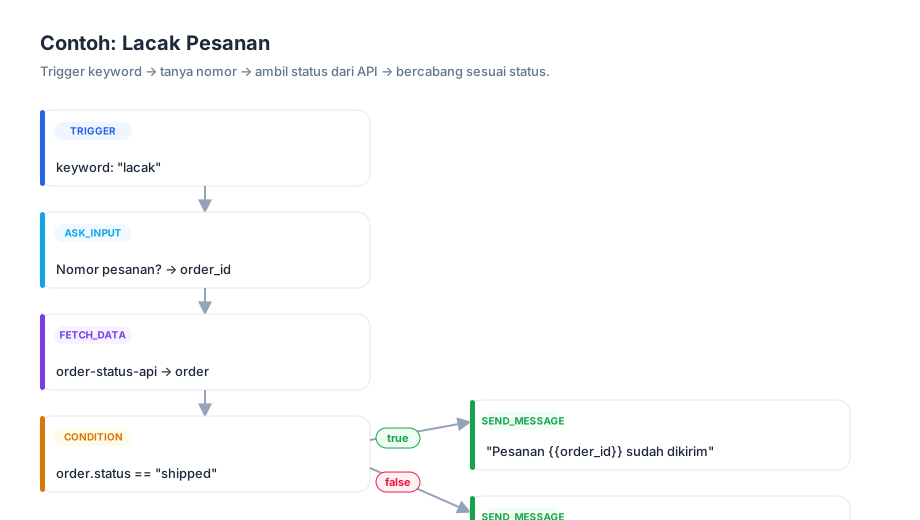
- Trigger keyword:
track,tracking,my order. - ask_input — prompt "Please send your order number",
store_as: order_id. - fetch_data —
connector_slug: order-status-api, args{ "order_id": "{{variables.order_id}}" },store_as: order. - condition — variable
order.status, operator==, valueshipped→ true to the "shipped" node, false to the "other status" node. - send_message — "Order {{variables.order_id}} status: {{variables.order.status}}."
Example 2: Lead Qualification
- Trigger keyword:
interested,product info,price. - ask_input — "May I have your name?",
store_as: name. - ask_input — "Roughly how many units do you need?",
store_as: qty, numeric validation. - condition — variable
qty, operator>=, value100→ true to escalate (large lead, to the sales team), false to ai_respond (self-serve info).
Example 3: FAQ with Handoff
- Trigger always.
- condition — variable
_trigger_message, operatorcontains, valueagent→ true to escalate, false continues. - ai_respond — instruction "Answer common questions: opening hours, location, how to order. If unsure, suggest talking to an agent."
Example 4: Appointment Booking
- Trigger keyword:
booking,appointment,reservation. - ask_input — "For which date? (e.g. 2026-06-10)",
store_as: date. - ask_input — "What time?",
store_as: time. - fetch_data —
connector_slug: booking-api, args{ "date": "{{variables.date}}", "time": "{{variables.time}}" },store_as: slot. - condition — variable
slot.available, operator==, valuetrue→ true to confirmation, false to an alternative-time offer.
Example 5: Complaint Triage
- Trigger keyword:
complaint,disappointed,broken,refund. - send_message — "We're sorry for the inconvenience. Let's help you right now."
- ask_input — "Could you describe the issue?",
store_as: complaint. - escalate — reason
complaint, message "I'll pass your complaint to our team."
Example 6: Product Recommendation
- Trigger keyword:
recommendation,find a product,which product. - ask_input — "What's your budget?",
store_as: budget, numeric validation. - fetch_data —
connector_slug: catalog-api, args{ "max_price": "{{variables.budget}}" },store_as: products. - ai_respond — instruction "Recommend products from this list that fit the budget: {{variables.products}}".